Construir tu Lumo
Entender proyectos, etapas y bloques
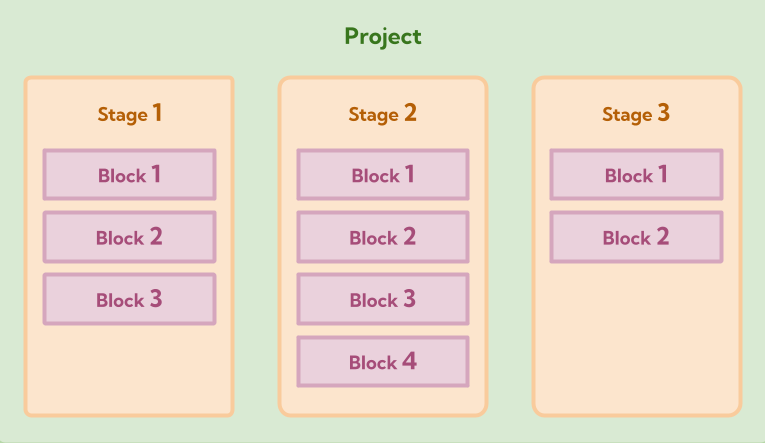
Para crear Lumos efectivos y organizados, es esencial comprender la estructura jerárquica central de LumoPages. Cada Lumo que crea se basa en tres componentes fundamentales: Projects, Stages y Blocks. Comprender cómo funcionan juntos estos elementos hará que su proceso de creación de formularios sea fluido e intuitivo.
La jerarquía de LumoPages
Piense en su Lumo como un libro.
- El libro completo es su Project.
- Cada capítulo del libro es un Stage.
- Las oraciones, párrafos o imágenes individuales dentro de un capítulo son los Blocks.
1. El proyecto: su formulario digital completo
En la cima de la jerarquía está el Project. Este es el contenedor que abarca todo lo relacionado con su Lumo.
- Qué es: El formulario digital completo que crea. Tiene su propio nombre, configuración y estado de publicación.
2. Etapas: las páginas o pasos de su formulario
Dentro de cada Project, construye Stages. Las etapas son como páginas individuales o pasos distintos dentro de su Lumo, guiando a sus usuarios a través del formulario de manera organizada.
- Qué es: Una sola pantalla o sección de su formulario con la que los usuarios interactúan. Un Lumo puede tener múltiples etapas, permitiéndole dividir formularios largos en partes digeribles.
- ¿Por qué usarlas? Las etapas mejoran la experiencia del usuario al prevenir la sobrecarga de información y hacer que los formularios largos parezcan menos intimidantes. Los usuarios completan una sección antes de pasar a la siguiente.
3. Bloques: los elementos de construcción de su formulario
A nivel granular, cada Stage se compone de varios Blocks. Los bloques son los elementos individuales que arrastra y suelta en una etapa para crear el contenido de su formulario y recopilar datos.
- Qué es: Las unidades de construcción fundamentales de su Lumo. Los bloques pueden ser bloques de contenido (mostrar información) o bloques de campo (recopilar entrada del usuario).
El poder de la estructura
Comprender esta jerarquía es clave para una creación eficiente de Lumos. Define su Project general, luego lo divide lógicamente en Stages manejables y, finalmente, puebla cada etapa con los Blocks específicos que necesita. Este enfoque estructurado le ayuda a crear formularios profesionales y fáciles de navegar que sirven efectivamente a su propósito.
Ahora que tiene una imagen clara de cómo se estructuran los Lumos, ¡pasemos a los pasos prácticos de agregar su primera etapa y poblarla con bloques!