Recopilación y gestión de datos
Descargar respuestas individuales (PDF)
La política de privacidad de LumoPages cubre los datos en nuestra plataforma. Cuando exporta datos, su protección y cumplimiento pasan a ser su responsabilidad. Asegúrese siempre de que sus prácticas cumplan con los estándares legales y éticos. Lea más sobre Privacidad de datos y cumplimiento en la exportación.
Aunque exportar todas sus respuestas de Lumo a CSV es excelente para el análisis de datos en masa, a veces necesita un registro limpio y presentable de un solo envío. LumoPages le permite descargar respuestas individuales como archivo PDF (Portable Document Format), proporcionando un documento con formato ordenado y fácil de compartir de interacciones específicas.
Esta guía le mostrará el sencillo proceso de descargar una sola respuesta de Lumo como PDF.
¿Por qué descargar respuestas individuales como PDF?
- Presentación profesional: Los PDF son ideales para una visualización limpia, legible y consistente en diferentes dispositivos e impresoras.
- Compartir fácilmente: Comparta una sola respuesta con colegas, partes interesadas o clientes sin exponer todos sus datos sin procesar.
- Mantenimiento de registros: Cree un archivo digital o impreso de envíos importantes.
- Revisión específica: Enfóquese en los comentarios de un cliente en particular o en una solicitud importante.
Paso a paso: descargar una sola respuesta como PDF
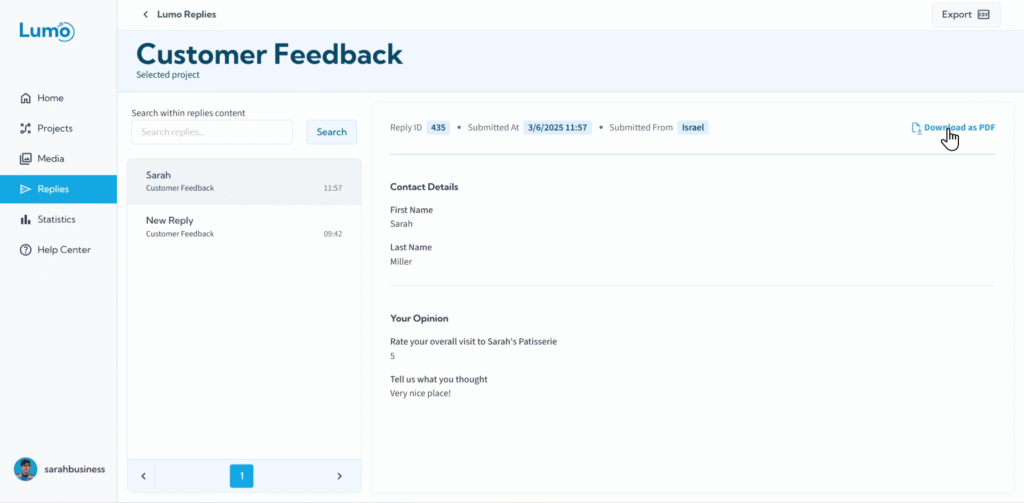
Haga clic para descargar. Haga clic en el botón "Download PDF".
- LumoPages generará el archivo PDF.
- Su navegador normalmente le pedirá que guarde el archivo en su computadora.
- Elija una ubicación y haga clic en "Save".
Qué hacer con su archivo PDF
Una vez descargado, puede:
- Ver y leer: Abrir el PDF en cualquier visor de PDF.
- Imprimir: Imprimir fácilmente una copia impresa del envío para registros físicos.
- Compartir: Adjuntar el PDF a correos electrónicos, enviarlo por aplicaciones de mensajería o subirlo al almacenamiento en la nube.
- Archivar: Mantener registros digitales de respuestas individuales importantes.
Aunque los PDF son excelentes para presentación y registros estáticos, recuerde que los datos dentro de un PDF no son fácilmente editables ni ordenables como los datos en un archivo CSV. Use PDF para revisión y compartición individual, y CSV para análisis en masa.
Descargar respuestas individuales como PDF proporciona una forma conveniente y profesional de manejar envíos de formularios específicos, dejándolos listos para revisión, compartición o mantenimiento de registros inmediatos.