Secciones personalizadas globales
Página de error personalizada
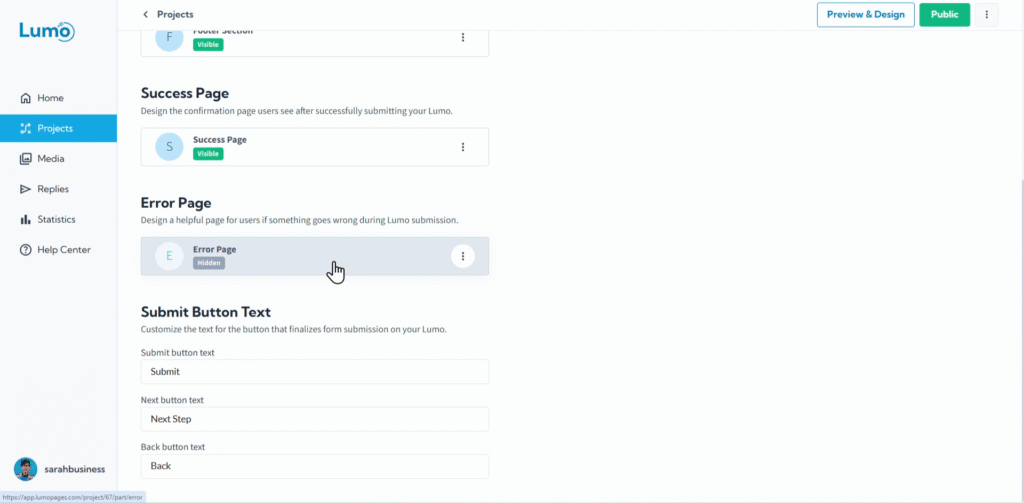
Aunque siempre nos esforzamos por lograr envíos fluidos, a veces pueden ocurrir problemas imprevistos que impiden que un Lumo se procese correctamente. En esos casos, una página de error bien diseñada es crucial para una comunicación clara y para mantener una imagen profesional. Transforma una posible frustración en una experiencia guiada.
Esta guía le mostrará cómo diseñar una página de error personalizada para su Lumo.
¿Qué es una página de error?
Una página de error es la página digital de pantalla completa que se muestra a sus usuarios si algo sale mal durante el proceso de envío (por ejemplo, un problema del servidor, un error crítico del sistema o un fallo de validación complejo no gestionado por errores de campos individuales). Sirve para:
- Informar: Indicar claramente al usuario que su envío no fue procesado.
- Guiar: Aconsejarle qué hacer a continuación (por ejemplo, intentar de nuevo, contactar con soporte).
- Mantener el profesionalismo: Evitar mostrar errores genéricos del sistema que no ayudan.
Paso a paso: acceder y diseñar su página de error
Diseñe su página con bloques de contenido. Al igual que la página de éxito, la página de error se construye exclusivamente con bloques de contenido. Esto le permite comunicar claramente el problema y guiar a sus usuarios:
- Button: Para proporcionar pasos de acción siguientes.
- Rich Text: Para un mensaje empático que explique el problema y ofrezca pasos siguientes.
- Image: Para incluir su logotipo o un icono que indique un error (por ejemplo, una cara triste, un signo de exclamación).
No puede agregar bloques de campo a la página de error. Esta página es únicamente para informar a los usuarios sobre un problema de envío.
Guarde sus cambios: después de diseñar su página de error personalizada, es crucial guardar los cambios manualmente. Busque el botón "Save" en su editor y haga clic en él.
Su página de error se activa en cuanto se guarda. Si su Lumo ya está en vivo, los cambios guardados en esta página se reflejarán de inmediato para los usuarios si ocurre un error de envío. Asegúrese siempre de que su mensaje sea claro y útil antes de guardar.
Al dedicar tiempo a diseñar una página de error personalizada, demuestra atención al detalle y empatía hacia sus usuarios, incluso cuando las cosas no salen perfectamente. Esto puede reducir significativamente la frustración del usuario y animarle a intentarlo de nuevo o a contactarle, en lugar de abandonar simplemente el formulario.