Publicación y compartición
Insertar tu Lumo en un sitio web
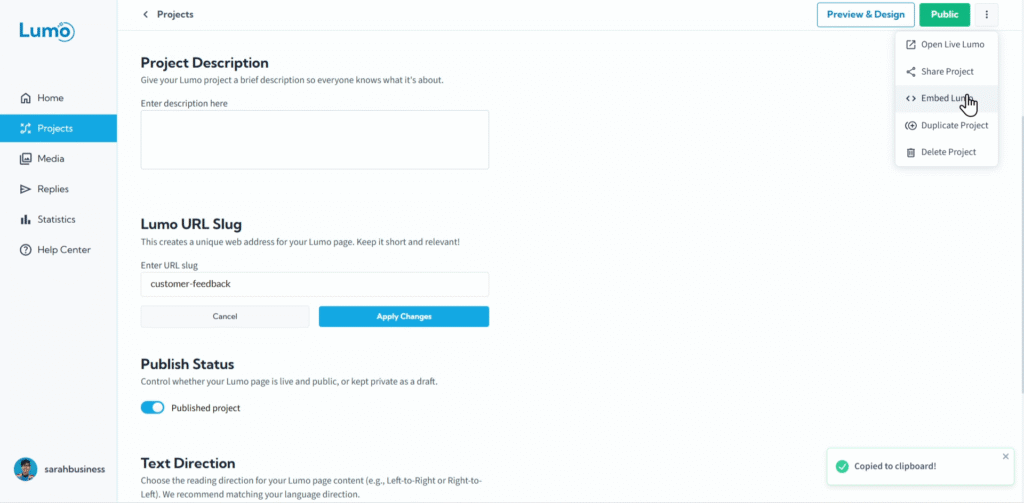
Para una integración fluida y una experiencia verdaderamente de marca, LumoPages le permite incrustar sus formularios digitales directamente en su sitio web o blog existente. Esto significa que sus usuarios pueden completar su Lumo sin salir de su sitio, creando un flujo cohesivo y profesional.
Esta guía le mostrará cómo obtener y usar el código de incrustación de su Lumo.
¿Por qué incrustar su Lumo?
- Experiencia de usuario fluida: Los usuarios completan el formulario sin ser redirigidos a otra URL, manteniendo el flujo de su sitio web.
- Marca mejorada: El Lumo aparece como parte integral de su sitio web, reforzando la identidad de su marca.
- Mayor conversión: Mantener a los usuarios en su sitio puede reducir las tasas de abandono de formularios.
- Profesionalismo: Una experiencia de formulario nativa se ve más pulida que simplemente enlazar externamente.
Paso a paso: incrustar su Lumo en un sitio web
Pegue el código de incrustación en su sitio web. Este es el paso crucial para la integración. Navegue al editor o sistema de gestión de contenido (CMS) de su sitio web (por ejemplo, WordPress, Wix, un sitio HTML personalizado).
- Encuentre la página o sección específica donde desea que aparezca su Lumo.
- Busque una opción para agregar HTML personalizado, código de incrustación o cambiar a una vista de "text" / "code" del editor de página.
- Pegue el código HTML de incrustación copiado directamente en esa área.
Los pasos exactos para pegar código HTML variarán según su plataforma de sitio web. Consulte la documentación de su constructor de sitios web para "how to embed custom HTML" o "how to add custom code".
Si actualiza su Lumo en el editor de LumoPages (por ejemplo, agrega nuevos campos, cambia colores, corrige errores tipográficos) y lo guarda, estos cambios se reflejarán automáticamente en su Lumo incrustado en su sitio web. No necesita volver a copiar y pegar el código de incrustación a menos que elimine el Lumo y cree uno nuevo.
Personalizar avisos incrustados (opcional)
En Project Settings → Embed Settings, puede elegir qué avisos de LumoPages aparecen dentro de un Lumo incrustado. Puede ocultar algunos, todos o ninguno de los siguientes:
- Legal links — Enlaces de Terms of Use, Privacy Policy y Accessibility mostrados en el pie de página del Lumo.
- LumoPages logo — La atribución “Built with LumoPages” (solo planes Plus y Pro).
- Cookie notice — El banner de consentimiento de cookies y almacenamiento mostrado en formularios incrustados.
Cada opción que active requiere que confirme que agregará un aviso equivalente en la página donde el Lumo está incrustado. Por ejemplo, si oculta los enlaces legales, debe enlazar a sus propios avisos de Terms, Privacy y Accessibility (o los aplicables) en esa página. Si oculta el aviso de cookies, debe proporcionar su propia divulgación y consentimiento de cookies o almacenamiento donde lo exija la ley.
Las páginas Lumo independientes (abiertas a través de live.lumopages.com) siempre muestran los avisos de LumoPages independientemente de estas configuraciones de incrustación.
Pruebe el Lumo incrustado. Abra su sitio web en un navegador para asegurar que el Lumo se carga correctamente y funciona como se espera dentro de su sitio.
Incrustar su Lumo en un sitio web proporciona una experiencia potente e integrada para sus usuarios, haciendo que sus formularios digitales sean una parte fluida de su presencia en línea.